


CalHeb Create an interface in Hebrew and English with Windev, Windev Mobile and Webdev
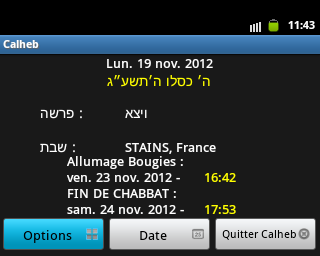
PC Soft explains very well in Help and step by step passing from one language to another with the Nation() function
/ / Pass the display language of the application in Hebrew
Nation(nationHebrew)
/ / Pass the font in Hebrew
ChangeCharset(charsetHebrew)
/ / Change the keyboard
ChangeKeyboard(languageHebrew)
/ / For a field entry is added
SAI_Saisie1..TextDirection = tdRightToLeft
This is very useful if you want to change the entire interface to display it in Hebrew.
But there is a then five disadvantages when, like me, you want an interface in French with Hebrew characters with or without vowels (nikoud)
* With the ANSI Version of Windev:
- (1) All fields are reversed (who were right is left and left to right).
- (2) The French accented characters do not appear or are replaced with Hebrew.
- (3) Default Hebrew has no vowels and if desired the Hebrew vowel it then just replaced.
- (4) The accent characters are not taken into account is 32 characters.
- (5) The property...SensEcriture is not existing on Android and Ios.
If you wish to display Eastern characters such as Hebrew and Western as the French in the same window there are three methods:
Already do not used the nation() function
- To put a text field or seizure in Hebrew using the ansivers unicode() function see (ANSI according PCSOFT).
- For an HTML field or language HTML, the easiest way is to encode in UTF 8 with overhung decimal or hexadecimal caractere.voir (coding HTML UTF 8 Hebrew for Windev and Webdev)
- For a field containing at the same time Hebrew and the French used the ansivers unicode() function see (ANSI according PCSOFT) parts in Hebrew.
- Windev Mobile (Pocket PC) to save a text file in Unicode format but oddly written upside down car...SensEcriture is not supported in my version (Windev Mobile 15) and must install a font Unicode on the Pocket PC see [create a Hebrew and French interface with Windev Mobile (Pocket PC)].
In Windev I come to write in Hebrew and Yiddish with or without vowels with some punctuation characters.